
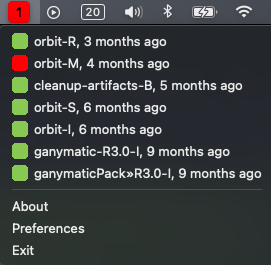
BuildNotify is a CCMenu/CCTray equivalent for Linux, macOS and Windows. It resides in your system tray and notifies you of the build status for different projects on your continuous integration servers. BuildNotify is largely inspired from the awesome CCMenu available for Mac.
- Monitor projects on multiple continuous integration servers that publish a cctray.xml feed, and GitHub Actions workflows.
- Access to overall continuous integration status from the system tray.
- Access individual project pages through the tray menu.
- Receive notifications for fixed/broken/still failing builds.
- Easy access to the last build time and build label for each project.
- Customize build notifications, or run your own script when a build changes.
- Optional single-colour tray icons (Shapes) that differ by shape.
- Unreachable servers show in the tray menu with their last error.
- Mute a server or project, or pause all notifications for an hour, from the tray menu.
BuildNotify needs Python 3.11 or newer. Install it as a tool with uv or pipx:
uv tool install buildnotify
# or
pipx install buildnotify
Launch it using buildnotify. This will show an icon in the system tray.
To try it without installing:
uvx buildnotifyThe Ubuntu and Debian packages are pretty old, so use the PyPI package to get the latest release. See the installation page for requirements and the GNOME tray note.
Every push to main replaces the nightly pre-release with a wheel, an sdist and a Flatpak bundle. These builds are untested by users and may be broken. The wheel has a .devN version, so uv and pip only pick it up when you ask for it:
uv tool install --prerelease allow https://github.com/anaynayak/buildnotify/releases/download/nightly/<wheel file name>Take the exact file name from the release page. A nightly is never published to PyPI.
Releases are built by GitHub Actions from a tag, published to PyPI with trusted publishing and attached to a GitHub Release. Each file has build provenance and SBOM attestations. After downloading the wheel, check it with the GitHub CLI:
gh attestation verify buildnotify-3.0.0-py3-none-any.whl --repo anaynayak/buildnotifyPyPI also lists the PEP 740 attestation for each file. See Development for the SBOM check and reproducible builds.
-
--settings PATHreads and writes settings in this INI file instead of the default location. -
--debuglogs every fetch.
Anything that publishes a cctray.xml feed. See https://cctray.org/servers/
GitHub Actions is read directly from the GitHub API, with optional workflow and branch filters.


